A MacBook battery is designed to provide dependable performance for years, but like any rechargeable battery, it gradually loses its ability to hold a charge. Knowing when your battery needs attention can help prevent unexpected shutdowns, poor performance, and inconvenience.
If your MacBook is showing unusual battery behavior, it may be time to consider professional MacBook battery replacement Dubai services. In this guide, we explain the most common warning signs, how to check battery health, and when professional assistance is recommended.
Why MacBook Battery Health Matters
Your MacBook depends on its battery for portable performance. As the battery ages, its capacity gradually decreases. This means you may notice shorter usage times, slower charging, or unexpected shutdowns.
A worn battery can also affect your overall experience, especially if you regularly work away from a power outlet. Identifying battery problems early allows you to replace the battery before the issue becomes more disruptive.
- Your MacBook Battery Drains Quickly
One of the clearest signs of battery deterioration is significantly reduced battery life.
If your MacBook once lasted several hours but now requires frequent charging, the battery may have lost a substantial amount of its original capacity. Although software, brightness, applications, and background processes can also affect battery life, consistently poor performance may indicate battery wear.
If charging several times a day has become normal, consider having the battery professionally inspected.
- The Battery Percentage Drops Suddenly
A healthy battery should generally provide relatively predictable charge levels. If your MacBook shows 50% battery and suddenly drops to 20%, or shuts down without warning, the battery may no longer be accurately maintaining or reporting its charge.
Unexpected percentage changes can be particularly frustrating when working on important documents or traveling. A professional diagnostic check can determine whether the battery is responsible.
- Your MacBook Shuts Down Unexpectedly
Unexpected shutdowns are another important warning sign.
If your MacBook turns off even though the battery indicator shows sufficient charge, the battery may be unable to deliver consistent power. However, shutdowns can also result from software problems, overheating, or hardware faults.
For this reason, professional diagnosis is recommended before replacing any component.
- macOS Shows a Battery Service Warning
Your MacBook includes built-in battery health information that can help identify battery deterioration.
Depending on your macOS version, you can check battery information through System Settings > Battery. Look for battery health information and any service-related recommendations.
If macOS indicates that the battery requires service, it is worth arranging an inspection. Continuing to use a significantly degraded battery may result in unreliable performance.
- The MacBook Takes Too Long to Charge
Another common indication is unusually slow charging.
If your MacBook takes considerably longer than usual to reach a full charge, the battery, charger, charging port, or power-management system could be responsible. Before assuming the battery is defective, check whether you are using a suitable charger and cable.
If the charging problem continues, professional testing can identify the underlying cause.
- Your MacBook Gets Hot During Normal Use
Some heat is normal when running demanding applications, but excessive or unusual heat should not be ignored.
A deteriorating or damaged battery can sometimes contribute to abnormal heat. If your MacBook becomes unusually warm during simple tasks, stop using it if you notice swelling, smoke, unusual odors, or other signs of physical battery damage.
In such circumstances, professional assistance should be sought immediately rather than attempting a DIY battery replacement.
- The MacBook Battery Is Swollen
Battery swelling is one of the most serious warning signs.
You might notice the trackpad becoming difficult to click, the bottom case separating slightly, or the MacBook no longer sitting flat on a surface. These symptoms can indicate that the internal battery has expanded.
Do not press, puncture, or attempt to remove a swollen battery yourself. Disconnect the MacBook from power and seek professional repair assistance as soon as possible.
How to Check Your MacBook Battery Health
Checking battery health can provide useful information before arranging a replacement.
On newer versions of macOS, open System Settings, select Battery, and review the available battery health information. You can also review battery usage and charging patterns.
For older MacBook models, battery cycle count can provide additional insight. A battery’s cycle count represents how many complete charge cycles it has gone through. However, cycle count alone does not determine whether a battery requires replacement.
A battery with relatively few cycles can still develop a fault, while another battery with more cycles may continue working adequately. Symptoms and diagnostic results are therefore more useful than relying on one number.
When Should You Consider MacBook Battery Replacement?
You should consider replacement when your MacBook consistently has poor battery life, unexpected shutdowns, charging problems, or a service recommendation.
The right time depends on your usage and the condition of the battery. If you primarily use your MacBook at a desk, reduced battery capacity may be less inconvenient. For students, professionals, and frequent travelers, however, dependable battery performance can be essential.
Professional MacBook battery replacement Dubai services can help identify whether the battery genuinely needs replacing and ensure the correct replacement is installed.
Why Professional Battery Replacement Is Recommended
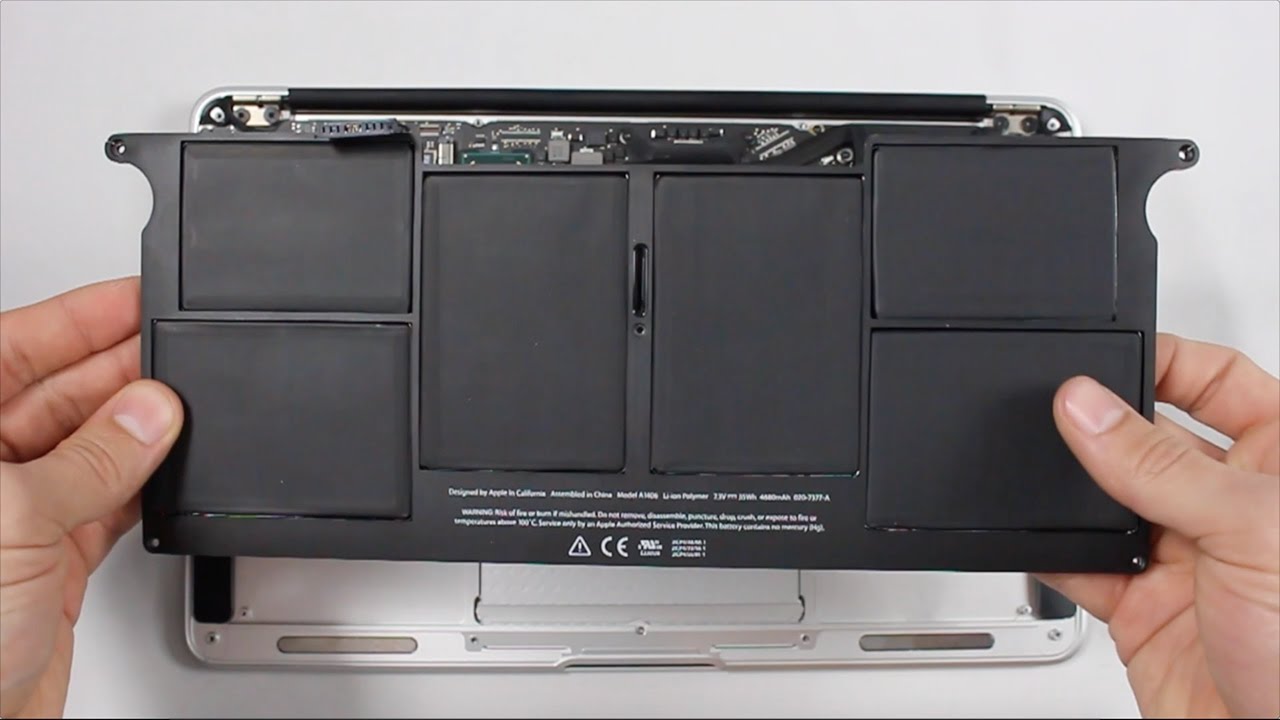
MacBooks contain compact internal components, and battery replacement requires careful handling. Choosing an experienced technician can reduce the risk of damaging connectors, the casing, display, or other internal components.
A professional Laptop MacBook Repair service Dubai provider can also diagnose related issues rather than automatically replacing the battery. This is important because charging problems can sometimes originate from the charger, charging port, logic board, or software.
If you use Microsoft devices as well, a professional repair provider may also assist with Surface repair Dubai services when needed.
For dependable support, Quik Fix UAE can help assess MacBook battery issues and recommend an appropriate repair solution.
How to Extend MacBook Battery Life
After replacing an aging battery, a few habits can help maintain battery performance:
- Keep macOS updated.
- Avoid exposing your MacBook to excessive heat.
- Reduce unnecessary background applications.
- Lower screen brightness when practical.
- Use a suitable, reliable charger.
- Avoid regularly allowing the battery to reach extremely low levels.
- Check battery health periodically.
- Store your MacBook in a cool, dry environment.
These steps cannot stop natural battery aging, but they can support better long-term performance.
Frequently Asked Questions
- How do I know if my MacBook battery needs replacement?
Common signs include rapid battery drain, unexpected shutdowns, charging problems, reduced battery capacity, and a macOS service recommendation.
- How often should a MacBook battery be replaced?
There is no fixed replacement schedule. Battery lifespan depends on usage, charging habits, model, age, and overall battery condition.
- Can I replace a MacBook battery myself?
MacBook batteries are integrated into compact internal assemblies, so professional replacement is generally safer than attempting a DIY repair without the appropriate tools and experience.
- Is a MacBook battery replacement expensive in Dubai?
The cost varies depending on the MacBook model, battery type, parts availability, and labor. A professional inspection can provide a more accurate estimate.
- Can a swollen MacBook battery be repaired?
A swollen battery should not be repaired or punctured. It should be handled and replaced by a qualified technician because damaged lithium-ion batteries can present safety risks.
- Can battery problems cause MacBook performance issues?
Yes. A severely degraded battery can contribute to unreliable operation, unexpected shutdowns, or charging-related problems. However, performance issues can have other causes, so diagnosis is recommended.
Get Your MacBook Battery Checked
Battery problems rarely improve with age. If your MacBook drains quickly, shuts down unexpectedly, charges unusually slowly, or displays a battery service warning, professional assessment can help determine the right solution.
For reliable MacBook battery replacement Dubai assistance, call +971 502705912 to discuss your MacBook battery issue and arrange professional support.