A slow MacBook can quickly turn simple tasks into frustrating experiences. Apps may take longer to open, files can become difficult to manage, and even basic browsing may feel sluggish. While occasional slowdowns can be normal, persistent performance problems often indicate an underlying software or hardware issue.
Professional MacBook repair services can help identify the cause and restore your device’s performance. Whether the problem is related to storage, memory, overheating, battery health, or macOS, an experienced technician can diagnose the issue and recommend the right solution.
For users looking for dependable MacBook support, understanding the common reasons behind slow performance can also help prevent future problems.
Why Is Your MacBook Running Slowly?
There are several reasons why a MacBook may become slower over time. Some problems are software-related and can be resolved through optimization, while others require hardware inspection or component replacement.
Common causes include:
- Insufficient storage space
- Too many applications running in the background
- Outdated macOS or software
- Excessive browser tabs and extensions
- Overheating
- Aging battery or hardware components
- Malware or unwanted software
- Failing SSD or other internal components
- Insufficient RAM for demanding workloads
Identifying the exact cause is important because applying the wrong solution may not improve performance.
- Check Available Storage
One of the most common causes of MacBook slowdowns is limited storage. When the internal drive becomes nearly full, macOS may have less room for temporary files, system operations, updates, and application processes.
Large videos, downloads, duplicate files, old applications, and cached data can gradually consume available space.
Start by reviewing your MacBook’s storage and removing files you no longer need. You can also move large personal files to an external drive or reliable cloud storage.
If the MacBook continues to perform poorly despite having adequate free space, professional MacBook repair services can help determine whether the storage drive itself is experiencing problems.
- Too Many Background Applications
Applications running in the background can consume processing power and memory. This becomes particularly noticeable when multiple demanding programs are open simultaneously.
Video editing software, design applications, virtual machines, browsers with numerous tabs, and other resource-intensive programs can place significant demands on your MacBook.
Closing applications you are not using can improve responsiveness. You should also review applications that automatically launch when you start your MacBook.
If an unknown application is consistently consuming excessive system resources, it may require further investigation by a qualified technician.
- Overheating Can Reduce Performance
Heat is another major factor behind MacBook performance issues. When internal temperatures rise significantly, the system may reduce processor performance to protect its components.
This process, commonly known as thermal throttling, can make your MacBook feel unusually slow.
Overheating may result from:
- Dust accumulation
- Blocked ventilation
- Heavy workloads
- A malfunctioning cooling system
- Dried or degraded thermal material
- Faulty internal components
Keeping your MacBook on a hard, flat surface and avoiding blocked ventilation can help with airflow. However, persistent overheating should be professionally inspected.
If you regularly experience high temperatures, unexpected shutdowns, or loud fan activity, contacting MacBook Repair Specialist Dubai can help identify whether internal cleaning or component-level repair is necessary.
- Keep macOS and Applications Updated
Outdated software can sometimes cause compatibility problems, bugs, or performance issues. Apple regularly releases macOS updates containing security improvements, bug fixes, and performance enhancements.
Check whether your MacBook is running a supported version of macOS and ensure important applications are updated.
However, before installing a major operating system update, make sure you have a recent backup. Older MacBooks may also have hardware limitations that affect how newer software performs.
A professional technician can assess your MacBook’s compatibility before recommending a software upgrade.
- Check Battery Health
Battery condition can also affect how a MacBook behaves. As batteries age, their capacity and overall health can decline.
A deteriorating battery may cause unexpected shutdowns, charging problems, reduced mobility, or other performance-related symptoms.
If your MacBook is several years old and performance problems appear alongside poor battery life, it may be worthwhile to have the battery professionally tested.
Replacing a worn battery can sometimes resolve related usability problems and make the device more dependable for everyday work.
- Look for Signs of Hardware Failure
Not every slow MacBook has a software problem. Hardware deterioration can cause gradual or sudden performance issues.
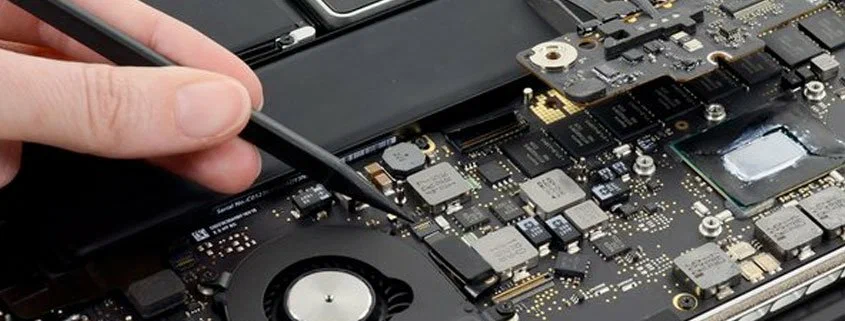
An aging SSD, memory problem, logic board fault, battery issue, or other internal component may affect system responsiveness.
Warning signs include:
- Frequent freezing
- Unexpected restarts
- Application crashes
- Unusual sounds
- Failure to boot normally
- Extremely slow file transfers
- Repeated system errors
If these symptoms occur together, avoid repeatedly forcing the MacBook to restart. Professional diagnosis can help prevent additional data or hardware complications.
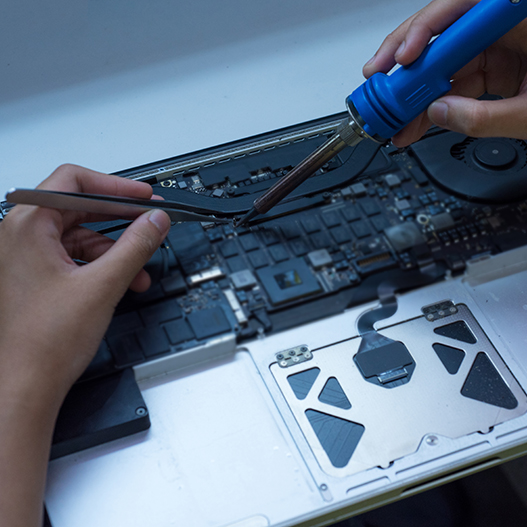
Experienced MacBook repair services can test the device and determine whether repair, component replacement, or software troubleshooting is the most appropriate option.
When Should You Contact a MacBook Repair Specialist?
Simple maintenance can resolve minor slowdowns, but professional assistance is recommended when the problem persists or is accompanied by unusual symptoms.
You should consider contacting a specialist if:
- Your MacBook remains slow after restarting
- The system frequently freezes
- The device becomes unusually hot
- Apps repeatedly crash
- The MacBook shuts down unexpectedly
- The storage drive shows errors
- The battery drains unusually fast
- You suspect internal hardware damage
For users in the UAE, a MacBook Repair Specialist Dubai can inspect the device and identify whether the slowdown is caused by software, hardware, overheating, or component degradation.
What About MacBook Water Damage?
Liquid exposure is another issue that can lead to performance problems. A MacBook affected by water or another liquid may initially appear to work normally but develop faults later.
Moisture can cause corrosion, short circuits, keyboard problems, charging faults, and logic board damage. Continuing to use a liquid-damaged MacBook may increase the risk of further component failure.
If your MacBook has been exposed to liquid, shut it down and seek professional assistance rather than attempting to charge or restart it repeatedly.
For users searching for MacBook water damage repair Dubai, professional inspection is especially important because liquid damage can affect multiple internal components.
How Professional MacBook Repair Services Help
A proper diagnostic process is essential before replacing components. A technician can assess system performance, inspect hardware, check battery health, evaluate storage, examine thermal conditions, and identify software-related issues.
The goal should not simply be to make the MacBook temporarily faster. A reliable repair process should address the underlying cause and help reduce the likelihood of the same issue returning.
Regular maintenance can also extend the useful life of your MacBook. Keeping storage organized, installing appropriate updates, maintaining adequate ventilation, and addressing hardware problems early can all contribute to better performance.
Keep Your MacBook Running Smoothly
Slow performance does not always mean that you need to replace your MacBook. In many cases, the underlying problem can be identified and resolved through proper troubleshooting, maintenance, or repair.
Start with simple steps such as freeing storage, closing unnecessary applications, updating supported software, and restarting the device. If performance remains poor or you notice overheating, crashes, unusual noises, or hardware-related symptoms, professional diagnosis is the safer option.
Quik Fix UAE provides professional support for users who need dependable MacBook troubleshooting and repair assistance.
If your MacBook has become unusually slow, call us today +971 502705912 to discuss your issue and arrange professional MacBook repair services. A timely diagnosis can help restore performance and keep your MacBook reliable for work, study, and everyday use.